Import .blend Files Into the Render Queue
Add one or many Blender .blend files to the RenderGod render queue from the Import menu, the empty queue, drag and drop or the Blender add-on.
Import .blend files to turn them into render jobs in the RenderGod queue. Each file becomes one job that starts with the scene, camera, frame range and render settings saved in the file.
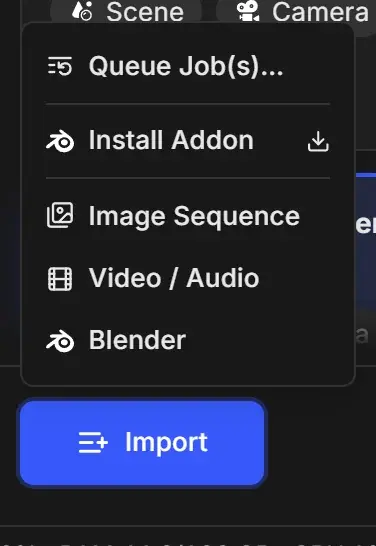
Import from the Import menu
Click Import at the bottom left of the queue. When the queue is empty, click Import Blender in the middle of the queue instead.
Choose Blender.
Select one or more .blend files and confirm. Hold Ctrl (Cmd on macOS) to pick several.
Wait for the new card to finish loading. While RenderGod reads the file, the card shows grey placeholder bars and a spinner.
When loading is done, the card shows Queued with its scene, camera and frame range badges.
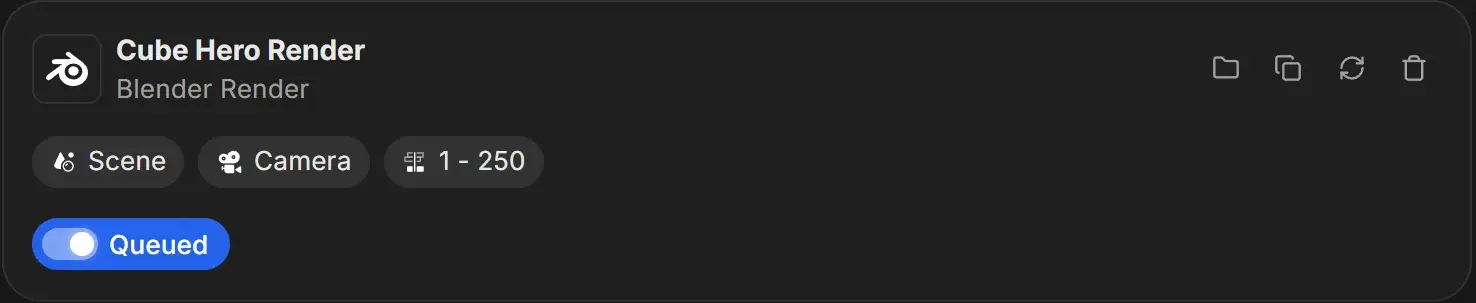
Click the card to open its render settings panel and adjust it before you start the queue.
Other ways to add a .blend file
| Method | How |
|---|---|
| Drag and drop | Drag files from Explorer or Finder anywhere onto the RenderGod window. See Drag and drop files. |
| Empty queue right-click | Right-click the empty queue area and choose Blender. |
| Blender add-on | Click Send to RenderGod inside Blender. See Send a scene from Blender. |
| macOS only | Use Open With in Finder, or drop the .blend on the RenderGod Dock icon. |
What happens during import
- The job name is the file name without
.blend. The card subtitle reads Blender Render. - Importing the same file twice creates two separate jobs.
- The first time you import a
.blend, RenderGod looks for Blender on your computer. If it finds none, the Blender version dialog opens so you can point it at an installation. See Find your Blender installations. - If something in the file needs your attention, a short notice appears for each problem, for example the file was saved with a Blender version you do not have installed, linked files are missing, or the scene saves its render to a folder that does not exist on this computer. The same notices appear in the render settings panel.
.blend file when importing. Settings you change in RenderGod are stored on the job. If you edit the file in Blender later, use Reload to read it again.