Importing Files
Supported File Types for Import in RenderGod
See every file type RenderGod can import, from .blend scenes to video, audio, image sequence frames and .rgjob job files, and the job each one creates.
This page lists every file type RenderGod accepts and the kind of job each one creates in the render queue. Anything not listed is refused with "Unsupported file type".
File types and the jobs they create
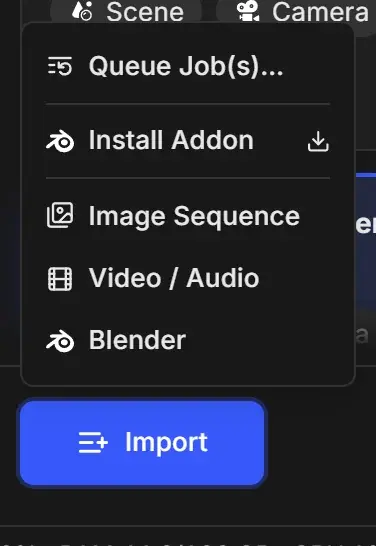
| File type | Extensions | Job created | How to import |
|---|---|---|---|
| Blender scene | .blend | Blender Render | Import > Blender, drag and drop, Blender add-on |
| Video | mp4, mov, avi, mkv, webm, wmv, flv | Video (converts to an image sequence by default) | Import > Video / Audio, drag and drop |
| Audio | mp3, wav, flac, m4a, ogg, opus, aac, wma | Audio | Import > Video / Audio, drag and drop |
| Image sequence (folder) | a folder of frames | Image Sequence (converts to a video by default) | Import > Image Sequence, drag and drop the folder |
| Single image | png, jpg, jpeg, exr, tiff, tga, bmp, hdr, dpx | Image Sequence for the folder the image is in | drag and drop |
| Job file | .rgjob | The jobs stored in the file | Import > Queue Job(s)…, drag and drop |
Extensions are not case sensitive, so .EXR and .exr both work.
Frames read inside an image sequence folder
When RenderGod reads a folder as a sequence, it uses frames with these extensions: png, jpg, jpeg, exr, tiff, tif, tga, bmp, hdr, dpx. See Import image sequences for naming rules.
Common files that are not accepted
| File | What to do |
|---|---|
A single .tif image | Import its folder with Import > Image Sequence. |
.webp, .gif images | Convert them to PNG first. |
.m4v, .mxf, .ts, .mts video | Rewrap or convert them to MP4 or MOV in another tool first. |
.cin frames | They can be dropped, but the conversion fails. Convert them to DPX or EXR first. |