Extract Audio From a Video File
Save the soundtrack of an MP4, MOV or MKV video as WAV, FLAC, MP3, AAC, OGG or Opus with RenderGod. The format matching the source codec is marked for you.
Extract audio from a video when you need the soundtrack on its own, for example to edit music separately, send a voice-over for review or line up sound in Blender's Video Sequencer.
Extract the audio
Import the video
Click Import > Video / Audio and pick the video, or drag it onto the window. Click the job card.
Switch to Audio
Under Convert Video To, click Audio.
Choose the audio format and start
Pick a format in Audio Format and click Start. The file is saved in Export Folder with the video's name, for example Cube Turntable.m4a.
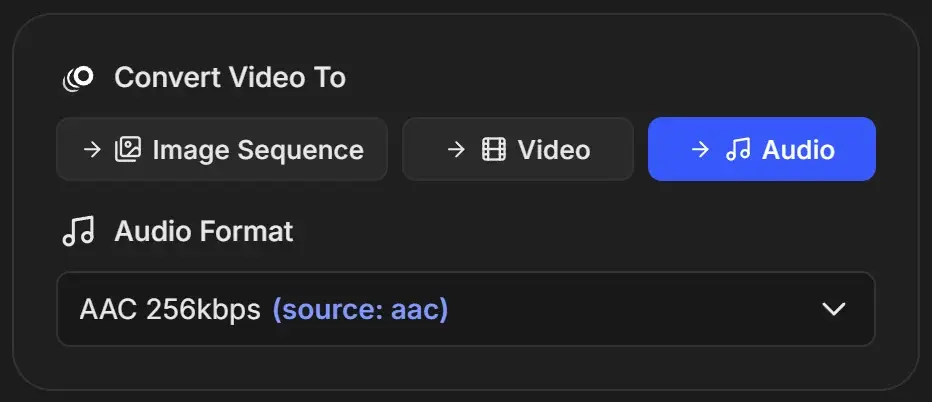
The source marker
The format closest to the video's own audio codec is marked, for example AAC 256kbps (source: aac). Choose it to stay close to the original. The audio is always re-encoded, so the marker means "same kind of audio", not an exact copy of the original bitrate.
Audio formats
| Group | Options | File | Use it for |
|---|---|---|---|
| Lossless | WAV (PCM 16-bit), WAV (PCM 24-bit), WAV (PCM 32-bit Float) | .wav | Editing and mixing in any audio or video app |
| Lossless | FLAC | .flac | Lossless archive at about half the size of WAV |
| MP3 | MP3 320kbps, 256kbps, 192kbps, 128kbps | .mp3 | Sharing and playback almost anywhere |
| AAC | AAC 320kbps, 256kbps, 192kbps, 128kbps | .m4a | Apple devices, web and video platforms |
| OGG / OPUS | OGG Vorbis HQ, OGG Vorbis | .ogg | Games and open-source tools |
| OGG / OPUS | OPUS 256kbps, 192kbps, 128kbps | .opus | Very small files with good quality, especially speech |
Higher bitrates sound better and make larger files. 256 or 320 kbps is transparent for most listeners. More detail is in Convert audio files.
Good to know
- The sample rate and channel count of the source are kept.
- If a video has several audio tracks, only the default track is extracted.
- A video with no audio track cannot be extracted and the job fails. Check the clip in a player first.
- The default format for new jobs is set in Conversion Defaults.