Video Encoding Formats Explained (H.264, H.265, ProRes, AV1)
Compare every RenderGod video format, from ProRes and DNxHD to H.264, H.265, AV1 and VP9: file size, quality, alpha support and editor support.
A video encoding format decides how big your file is, how good it looks, whether it keeps transparency and which apps open it smoothly. This guide explains every codec, quality level and container you can pick in RenderGod, so you can choose the right one for editing, review or delivery.
Quick answer
| You want | Pick |
|---|---|
| A master to edit or grade | ProRes 422 HQ mov |
| Transparency for compositing | ProRes 4444 (Alpha) mov |
| A file anyone can play | H.264 High mp4 |
| Near-master quality in a small, playable file | H.264 Visually Lossless mp4 |
| Social media upload | H.264 16Mbps (Social Media) mp4 |
| The smallest file at good quality | H.265 High mp4, or AV1 for web delivery |
| Transparency on a web page | VP9 in webm with the yuva420p pixel format |
Two kinds of codecs
- Editing (intermediate) codecs: ProRes, DNxHD, Animation, PNG Lossless and Uncompressed. Every frame is stored on its own, so scrubbing and cutting are fast and quality survives re-encoding. Files are large.
- Delivery codecs: H.264, H.265, AV1 and VP9. Frames are compressed against each other, so files are small but heavier to decode on a timeline. Use them for the final file you send or upload.
Codec comparison
| Codec | File size | Quality | Alpha | Containers | Works well in |
|---|---|---|---|---|---|
| ProRes | Large | Very high, built for editing | 4444 profile only | mov, mkv | Final Cut, Premiere, After Effects, DaVinci Resolve, Nuke, Avid Media Composer |
| DNxHD | Large | Very high, built for editing | No | mov, mkv | Avid Media Composer, Premiere, DaVinci Resolve |
| H.264 | Small | Good to near lossless, depends on quality level | No | mp4, mkv | Every player, browser, phone, editor and upload site |
| H.265 (HEVC) | About 30-50% smaller than H.264 at similar quality | Good to near lossless | No | mp4, mkv | Modern editors, Apple devices, recent TVs and phones. Older PCs may need a codec pack or play it slowly. |
| AV1 | Smallest | Very good for its size, slow to encode on the CPU | No | mp4, mkv | Browsers, YouTube and web delivery. Limited support in editing apps. |
| VP9 | Small | Good | Yes, with yuva420p in webm | webm, mkv | Browsers and web pages. Poorly supported in editing apps. |
| Uncompressed | Huge | Perfect | Yes, with rgba or bgra | mov, mkv | Compositing and hand-off when nothing may change the pixels |
| Animation (QuickTime Animation) | Very large | Lossless | The codec can store alpha | mov, mkv | Adobe apps and older motion graphics workflows |
| PNG Lossless | Very large | Lossless | The codec can store alpha | mov, mkv | Adobe apps and compositing tools |
H.264, H.265 and AV1 drop transparency. If your frames have alpha and you pick one of them, the transparent areas become solid.
Built-in formats
| Format | Codec and settings | Alpha | Typical use |
|---|---|---|---|
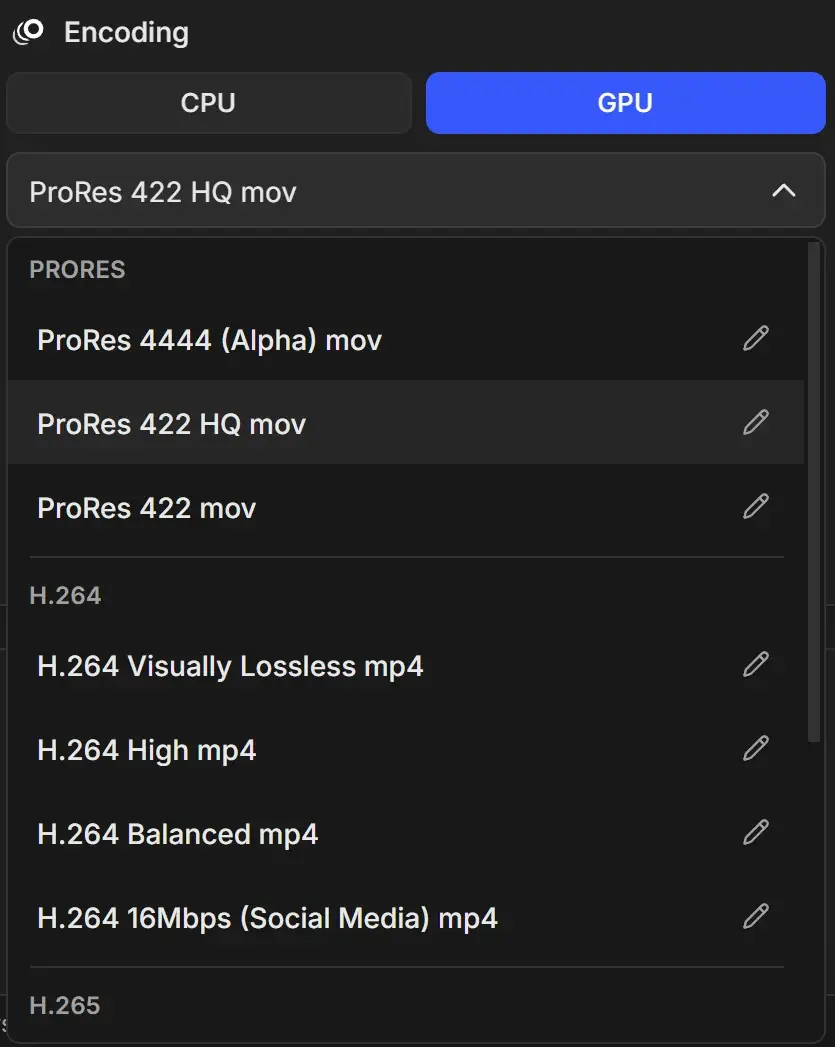
| ProRes 4444 (Alpha) mov | ProRes 4444, 10-bit 4:4:4 | Yes | Compositing, titles and overlays with transparency |
| ProRes 422 HQ mov | ProRes 422 HQ, 10-bit 4:2:2 | No | High-quality editing master. The default for new image sequence conversions. |
| ProRes 422 mov | ProRes 422, 10-bit 4:2:2 | No | Editing with smaller files than HQ |
| H.264 Visually Lossless mp4 | H.264, quality level Visually Lossless | No | Near-master quality that still plays everywhere |
| H.264 High mp4 | H.264, quality level High | No | Client reviews, web and general delivery |
| H.264 Balanced mp4 | H.264, quality level Balanced | No | Quick previews and small files |
| H.264 16Mbps (Social Media) mp4 | H.264 at a fixed 16 Mbps | No | Uploads to social platforms |
| H.265 Visually Lossless mp4 | H.265, quality level Visually Lossless | No | High-quality archive in a small file |
| H.265 High mp4 | H.265, quality level High | No | Delivery with smaller files than H.264 |
| H.265 Balanced mp4 | H.265, quality level Balanced | No | Small review files |
All built-in MP4 formats are web optimized, so they start playing before they finish downloading. You can add formats for AV1, VP9, DNxHD, Uncompressed, Animation and PNG Lossless in the Format Manager.
ProRes profiles
| Profile | Relative size | Use it for |
|---|---|---|
| ProRes 422 Proxy (0) | Smallest | Offline editing on slow machines |
| ProRes 422 LT (1) | Small | Lighter editing files, dailies |
| ProRes 422 (2) | Medium | Standard editing |
| ProRes 422 HQ (3) | Large | Masters and grading |
| ProRes 4444 (4444) | Largest | Transparency, highest color detail, compositing |
DNxHD profiles
| Profile | Bitrate | Use it for |
|---|---|---|
| DNxHD 220x (220M) | 220 Mbps | Mastering quality |
| DNxHD 145 (145M) | 145 Mbps | High-quality editing |
| DNxHD 36 (36M) | 36 Mbps | Offline editing |
Quality levels
H.264, H.265, AV1 and VP9 formats use a quality level instead of a fixed bitrate. Files get bigger from left to right.
| Level | Result | When to use it |
|---|---|---|
| Extreme Low | Very small, visibly blocky | Tiny drafts |
| Low | Small, soft detail | Quick previews |
| Balanced | Good quality, moderate size | Everyday review copies |
| High | Very good quality | Delivery and client review |
| Visually Lossless | Hard to tell from the source | Masters in a delivery codec, archives |
| Lossless | Bit-exact, often 5-20 times larger than Visually Lossless | Only when a pipeline requires bit-perfect output |
H.264 and H.265 can also use a fixed Bitrate in Mbps instead, which gives predictable file sizes. Upload sites often ask for a bitrate. See Create a custom encoding format.
Containers
| Container | Good for |
|---|---|
| mp4 | Delivery and playback everywhere. Holds H.264, H.265 and AV1. |
| mov | Editing apps, especially for ProRes, DNxHD, Animation, PNG Lossless and Uncompressed |
| mkv | Flexible container that holds any codec. Great in VLC and some editors, less so in Adobe apps and on phones. |
| webm | Web pages and browsers. Holds VP9. |
Pixel formats and profiles
| Setting | Meaning |
|---|---|
yuv420p | 8-bit, standard color. Plays everywhere. |
yuv420p10le | 10-bit. Smoother gradients, less banding. Needs a player or editor that supports 10-bit. |
yuv422p10le | 10-bit with more color detail. Mostly for editing and grading. |
yuva420p | VP9 with alpha |
rgb24, bgr24 / rgba, bgra | Uncompressed without or with alpha |
Profile baseline, main, high (H.264) | high is best for almost everything. baseline is only for very old devices. |
Profile main, main10 (H.265) | main for 8-bit, main10 for 10-bit |
On macOS
GPU encoding uses NVIDIA, AMD or DirectX 12 hardware for H.264, H.265 and AV1, with quality levels mapped to the encoder's own quality scale. See GPU and CPU encoding.