Detect and Recover Frozen Frames in Blender
Set a frozen frame timeout so RenderGod notices a Blender frame that hangs, restarts Blender and renders it again instead of stalling your render all night.
Sometimes Blender does not crash but stops making progress on a frame. RenderGod can detect frozen frames: any frame that takes longer than a timeout you choose is treated as frozen, Blender is closed, and the frame is rendered again. Frozen frame detection works on Windows and macOS.
Turn on frozen frame detection
Open Settings > UnCrash Render Recovery.
Turn on Frozen frames.
Use the - and + buttons to set the timeout, from 5 to 60 minutes in steps of 5. The row description updates, for example "A frame slower than 5 min counts as frozen".
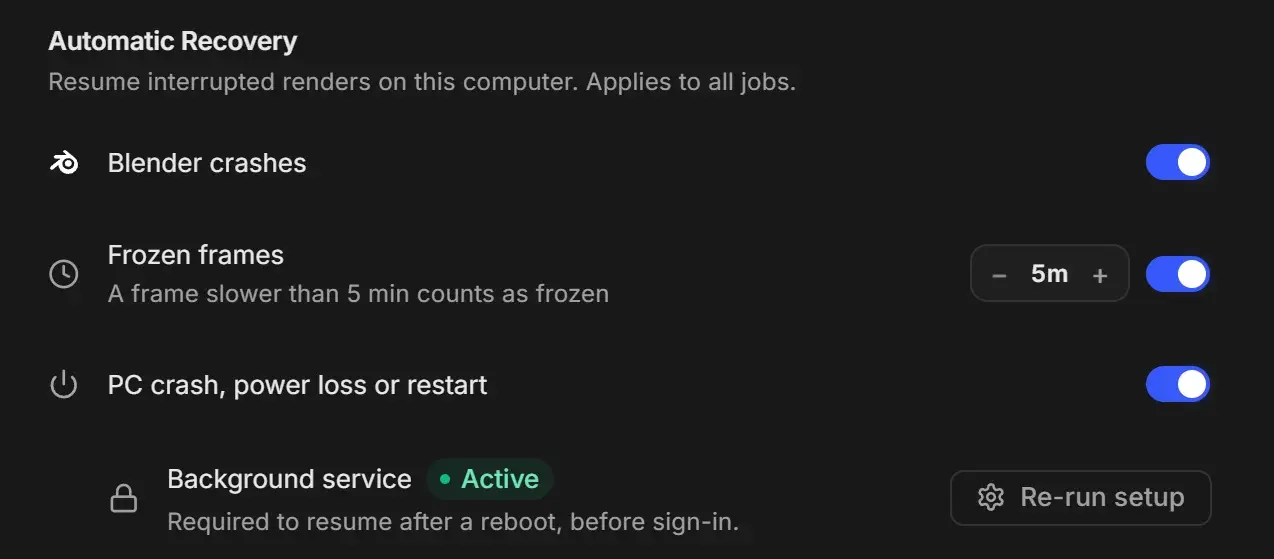
The Frozen frames switch is also on the UnCrash card in the render settings panel. Both show the same setting.
Choose the right timeout
The timeout is measured per frame, not for the whole job.
- Render a few frames of your heaviest shot and look at the frame timer on the job card. See Progress, frame timer and time remaining.
- Set the timeout well above the slowest frame. A good rule is at least twice the slowest normal frame.
| Slowest normal frame | Suggested timeout |
|---|---|
| Under 2 minutes | 5m |
| 5 minutes | 10m to 15m |
| 15 minutes | 30m |
| 25 minutes or more | 60m |
The timeout applies to every job on this computer. When the queue mixes light and heavy scenes, set the timeout for the heaviest one.
What happens when a frame freezes
- The frame runs longer than the timeout.
- RenderGod closes Blender, starts it again and renders the same frame. The job stays in Rendering and shows "Preparing render output" while Blender loads.
- You get the same signals as for a crash: a "Recovered render" toast, a desktop notification if the window is not in front, and a Telegram message if Crash recovered is on.
When a frame keeps freezing
A frame that fails twice is skipped, and the job card shows a note such as "Skipped stuck frames: 12, 13" and a Skipped Frames box with the frame numbers. The render continues with the next frame.
If too many frames in a row are skipped (Skipped frames in a row before stopping the job, default 5), the job stops with the status Failed. See Skipped frames and how to re-render them.