Smart Export Path Feature - Automatic Folder Organization
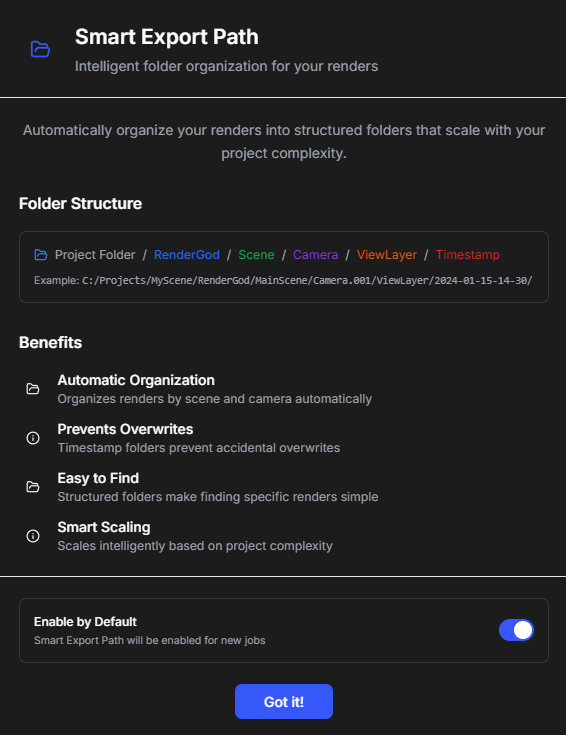
Smart Export Path automatically organizes your render outputs into well-structured folders, making it easy to find and manage your rendered files.
Smart Export Path Feature - Automatic Folder Organization
Smart Export Path automatically organizes your render outputs into well-structured folders, making it easy to find and manage your rendered files.
Overview
Smart Export Path is an intelligent folder organization system that automatically creates and manages export folders for your render outputs. It ensures your files are organized logically and are easy to find.
What Smart Export Path Does
Smart Export Path automatically:
-
Creates organized folders: Sets up folder structures for your renders
-
Names folders intelligently: Uses meaningful names based on your project
-
Maintains organization: Keeps your render outputs well-organized
-
Updates automatically: Adjusts folder paths as needed
-
Prevents overwrites: Ensures files don't overwrite each other
How It Works
Automatic Folder Creation
When you import a job, Smart Export Path:
-
Analyzes the project: Examines the source file location and name
-
Creates output folder: Generates an appropriate output folder
-
Organizes structure: Sets up folder hierarchy if needed
-
Sets export path: Configures the job to use this path
Intelligent Naming
Smart Export Path uses intelligent naming conventions:
-
Project-based: Names folders after your project files
-
Date-based: Can include dates for organization
-
Version-based: Can include version numbers
-
Custom patterns: Supports custom naming patterns
Configuration
Accessing Smart Export Path Settings
-
Go to Settings > Default Settings or Smart Export Path
-
Find Smart Export Path configuration options
-
Configure your preferred folder structure and naming patterns
Setting Up Folder Structure
You can configure:
-
Base folder: Where all exports are stored
-
Subfolder structure: How subfolders are organized
-
Naming patterns: How folders are named
-
Version handling: How versions are managed
Customization Options
Smart Export Path supports:
-
Custom patterns: Define your own naming patterns
-
Variable support: Use variables like project name, date, version
-
Folder hierarchy: Configure multi-level folder structures
-
Path templates: Create reusable path templates
Benefits
Organization
-
Well-organized files: All renders are in logical locations
-
Easy to find: Quickly locate your rendered files
-
Consistent structure: Same organization across all projects
-
Professional workflow: Clean, professional file organization
Time Saving
-
No manual setup: Folders are created automatically
-
No path management: Don't need to set paths manually
-
Quick access: Find files quickly with organized structure
-
Less confusion: Clear organization reduces confusion
Automation
-
Automatic creation: Folders created when needed
-
Automatic updates: Paths update automatically when needed
-
Smart adjustments: System adjusts paths intelligently
-
Error prevention: Prevents path-related errors
Best Practices
Folder Structure
-
Keep it simple: Don't create overly complex folder structures
-
Be consistent: Use consistent patterns across projects
-
Make it searchable: Use names that are easy to search for
-
Date organization: Consider date-based organization for time-based projects
Naming Conventions
-
Descriptive names: Use names that describe the content
-
Avoid special characters: Stick to standard characters
-
Include version info: Add version numbers when relevant
-
Keep it short: Avoid overly long folder names
Maintenance
-
Regular cleanup: Periodically clean up old render folders
-
Archive old renders: Move old renders to archive locations
-
Monitor disk space: Keep an eye on disk space usage
-
Review structure: Periodically review and improve folder structure
Troubleshooting
Folders Not Creating
-
Check permissions: Ensure RenderGod has write permissions
-
Check path: Verify the base path is valid and accessible
-
Check disk space: Ensure there's enough disk space
-
Restart RenderGod: Sometimes a restart helps
Wrong Folder Structure
-
Review settings: Check Smart Export Path configuration
-
Check patterns: Verify naming patterns are correct
-
Test with new job: Test with a new job to verify settings
-
Update settings: Adjust settings if needed
Path Issues
-
Check paths: Verify all paths are valid
-
Check permissions: Ensure RenderGod can create folders
-
Check network: If using network paths, verify connectivity
-
Manual override: You can always set paths manually if needed
Related Features
-
Default Settings: Configure default export paths
-
Queue Management: Manage jobs with Smart Export Path
-
Blender Render Queue: Smart Export Path works with all job types
Smart Export Path keeps your renders organized automatically. Configure it once and enjoy organized outputs!

© 2026 RenderGod. All rights reserved.