Badge Display Feature - Queue Information Tags
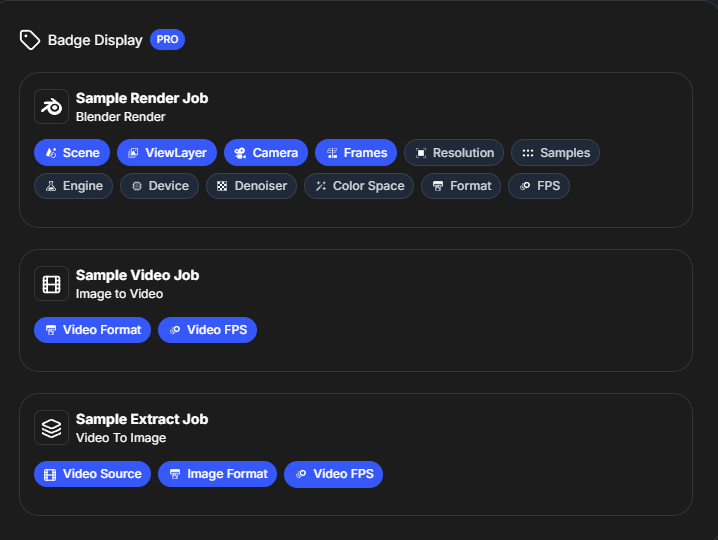
Control the display of information badges in your render queue. Badges help you quickly identify job types and status at a glance.
Badge Display Feature - Queue Information Tags
Control the display of information badges in your render queue. Badges help you quickly identify job types and status at a glance.
Overview
Badges are visual tags that appear on job cards in the render queue, providing quick visual identification of job types and properties. The Badge Display feature allows you to show or hide these badges based on your preferences.
What Are Badges?
Badges are small colored tags that appear on render queue job cards, indicating:
- Job type: What kind of job it is (Blender Render, Video to Image Sequence, etc.)
- Status indicators: Current status of the job
- Quick identification: Instant visual recognition of job properties
Accessing Badge Display Settings
- Click the Settings button (gear icon) in the top-right corner
- Navigate to the "Badge Display" tab
- You'll see toggles for showing/hiding different badge types
Badge Types
Blender Render Badges
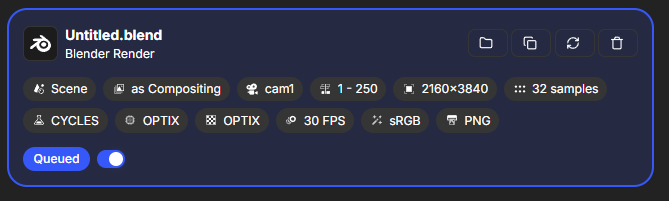
Blender Render jobs display badges indicating:
- Render type: Shows it's a Blender render job
- Scene information: May show scene name or number
- Camera information: May indicate camera settings
- View layer: May show active view layer
These badges help you quickly identify Blender render jobs in your queue.
Video to Image Sequence Badges
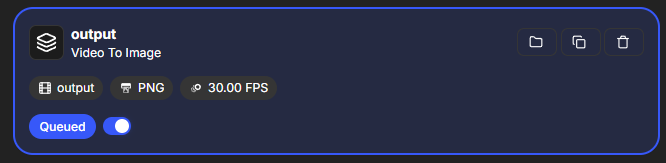
Video conversion jobs display badges showing:
- Conversion type: Indicates it's a video to image sequence job
- Video format: May show source video format
- Image format: May show target image format
- Status: Current conversion status
These badges make it easy to spot video conversion jobs.
Image Sequence to Video Badges
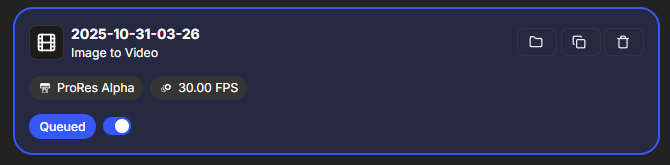
Image sequence to video jobs display badges indicating:
- Conversion type: Shows it's an image sequence to video job
- Video format: May show target video format
- Frame rate: May display frame rate information
- Sequence info: May show sequence details
These badges help identify video creation jobs.
Showing and Hiding Badges
Enabling Badge Display
- Go to Settings > Badge Display
- Enable the toggles for badge types you want to see
- Badges will appear on job cards in the queue
Disabling Badge Display
- Go to Settings > Badge Display
- Disable the toggles for badge types you want to hide
- Badges will be hidden on job cards
Selective Display
You can choose to show only certain badge types:
- Show all badges: Enable all toggles for maximum information
- Show specific types: Enable only the badges you find useful
- Hide all badges: Disable all toggles for a cleaner interface
Benefits of Badges
Quick Identification
- Instant recognition: Immediately see what type of job each item is
- Visual scanning: Quickly scan the queue for specific job types
- No reading needed: Visual indicators are faster than reading text
Organization
- Queue organization: Easily organize and understand your queue
- Job type grouping: Visually group similar job types
- Status awareness: Quickly see job status at a glance
Workflow Efficiency
- Faster decision making: Make decisions about queue management faster
- Better organization: Keep your queue organized and understandable
- Professional appearance: Clean, organized queue appearance
Best Practices
When to Show Badges
- Multiple job types: Show badges when you have different job types in queue
- Complex queues: Display badges for complex queues with many jobs
- Team environments: Show badges when multiple people use the queue
- Learning: Display badges when learning to use RenderGod
When to Hide Badges
- Simple queues: Hide badges if you only use one job type
- Minimal interface: Hide badges for a cleaner, minimal interface
- Personal preference: Hide badges if you prefer less visual clutter
- Performance: Hide badges if you experience performance issues (rare)
Customization
While you can't customize badge colors or designs, you can:
- Control visibility: Show or hide badge types
- Mix and match: Show some badge types while hiding others
- Change anytime: Update badge display settings anytime
Troubleshooting
Badges Not Showing
- Check settings: Verify badge display is enabled in settings
- Check job type: Ensure the job type supports badges
- Restart RenderGod: Sometimes a restart helps refresh the display
- Update RenderGod: Ensure you're using the latest version
Badges Cluttering Interface
- Hide selectively: Hide specific badge types you don't need
- Hide all: Disable all badges for a cleaner interface
- Customize display: Adjust which badges are shown
Related Features
- Queue Management: Manage jobs that display badges
- Default Settings: Configure default badge display preferences
- Theme Settings: Badges adapt to your theme selection
Badge Display helps you quickly identify and organize your render queue. Configure it to match your workflow preferences!

© 2026 RenderGod. All rights reserved.